Google Maps is gaining some features previously exclusive to Google’s navigation app, Waze. The company confirmed it’s rolling out the ability for Google Maps users to see speed limits, speed cameras and mobile speed cameras in more than 40 countries worldwide — an expansion of its earlier launch of these features, which were previously limited to select markets.
The change was noted earlier by ZDNet and, of course, Reddit.
Google confirmed with TechCrunch the full list of supported countries now seeing the speed cameras, which currently includes: Australia, Brazil, U.S., Canada, U.K., India, Mexico, Russia, Japan, Andorra, Bosnia and Herzegovina, Bulgaria, Croatia, Czechia, Estonia, Finland, Greece, Hungary, Iceland, Israel, Italy, Jordan, Kuwait, Latvia, Lithuania, Malta, Morocco, Namibia, Netherlands, Norway, Oman, Poland, Portugal, Qatar, Romania, Saudi Arabia, Serbia, Slovakia, South Africa, Spain, Sweden, Tunisia, and Zimbabwe.
Google had not been quick to integrate Waze’s best features into its own Google Maps app, following its 2013 acquisition of the popular navigation app. Instead, it seems to prefer using Google Maps as a broader platform for helping people find places including — most importantly — nearby businesses and Google advertisers.
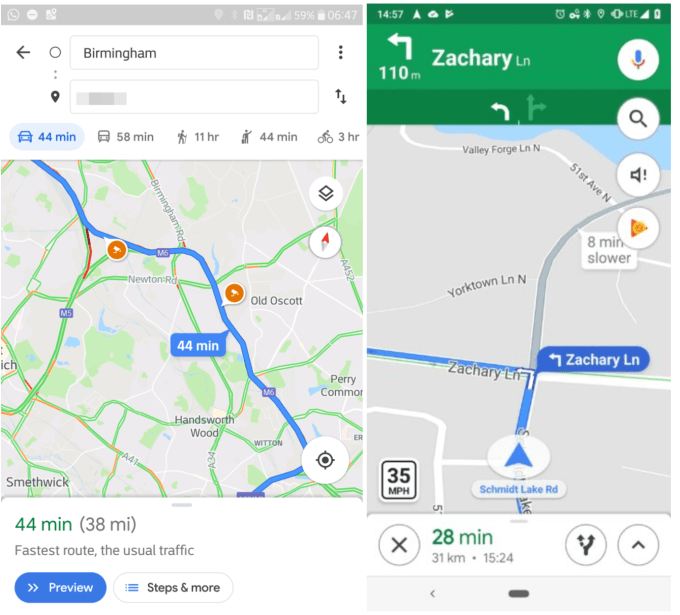
Above: Image credit – Android Police
But last year, some people began to spot incident reports as well as crash and speed trap reports appearing in Google Maps. Those features were not broadly rolled out to all users at that time, however.
Now, that’s starting to change.
Google began to roll out the ability for users in more countries to see speed cameras around two weeks ago, we understand. The rollout is taking place on both Android and iOS. But Android users will additionally be able to report mobile speed cameras and stationary cameras, while both iOS and Android users will be able to see those updates during their drive.
The speed limit appears in the bottom corner of the app, while speed traps show up as icons on the roads themselves.
The features will likely appeal to users who want similar functionality as to what’s available today in Waze, but don’t either care for the Waze user interface (which can be overwhelming if you’re not used to it), or the way Waze chooses its routes.
There has been some confusion over where and when these alerts would be available, as Google failed to officially announce the features’ expansion. Adding to the confusion was the fact that people were seeing the changes appear at different stages of the rollout in different countries around the world.
Despite the usefulness of speed-related alerts, Waze remains the more useful navigation platform due to its ability to crowdsource reports of all kinds — including police ahead, crashes, cars pulled over on the side of the road, gas prices, road closures, obstacles in your path like debris, red light cameras and more.
We understand Google Maps uses a combination of authoritative feeds along with feedback from Google Maps users in order to locate the speed cameras.
from TechCrunch https://tcrn.ch/2EF8OGA
Comments
Post a Comment